Guides
Voice AI & chat agents
Connect any AI voice or chat agent to eligibility.dev so it can verify a patient's insurance coverage in real time — mid-conversation, before booking.
Standard eligibility only
This guide is for callers who know their insurance provider and have their member ID handy. The prompt template below does not include a coverage search fallback. If your clinic has coverage search enrolled and you want the agent to fall back when the standard check fails, download the hybrid template below instead — or see the coverage search guide for clinics that skip standard eligibility entirely.
How it works
The agent collects the patient's insurance details during the call, then fires a single API request to eligibility.dev. The response tells the agent whether coverage is active — no human in the loop, no hold music.
- 1Agent collects payer name, member ID, date of birth, and patient name during the conversation.
- 2Agent calls
GET /api/eligibility/checkwith those values as query parameters plus yourX-Client-Idand API key headers. - 3eligibility.dev returns a JSON response. The agent reads
benefitSummary.coverageActiveto decide whether to proceed to booking.
Parameters to collect
The agent needs to gather these values before triggering the eligibility check. Map them to the corresponding API query parameters.
payerNamestringThe name of the insurance provider (e.g. “Cigna”, “Blue Cross”). eligibility.dev fuzzy-matches this against the payer catalog.
memberIdstringThe insurance member ID or benefits number on the patient's card.
patientFirstNamestringFirst name of the insured patient.
patientLastNamestringLast name of the insured patient.
patientDateOfBirthstringDate of birth in YYYY-MM-DD format (e.g. 1991-02-02).
Handling the response
Only three response states matter for agent flow control:
Coverage active
success = true and benefitSummary.coverageActive = true. Proceed to booking.
Coverage not active
success = true and benefitSummary.coverageActive = false. Do not book; offer to have a human follow up.
Unable to verify
success = false, or benefitSummary missing. Do not book; escalate to staff.
Don't read benefit details aloud
Instruct your agent to only use coverageActive for flow control. Never read deductible, copay, coinsurance, out-of-pocket, or trace IDs to the caller — these figures are preliminary and could create billing expectations.
Starter system prompt
The template below is a production-ready system prompt for a chiropractic intake agent. It covers identity capture, insurance verification, real-time eligibility checking, and booking gating — adapt the practice name, accepted payer list, and appointment slots for your use case.
Download prompt template (.md)Download hybrid template — standard + coverage search fallback (.md)GoHighLevel — Custom Action setup
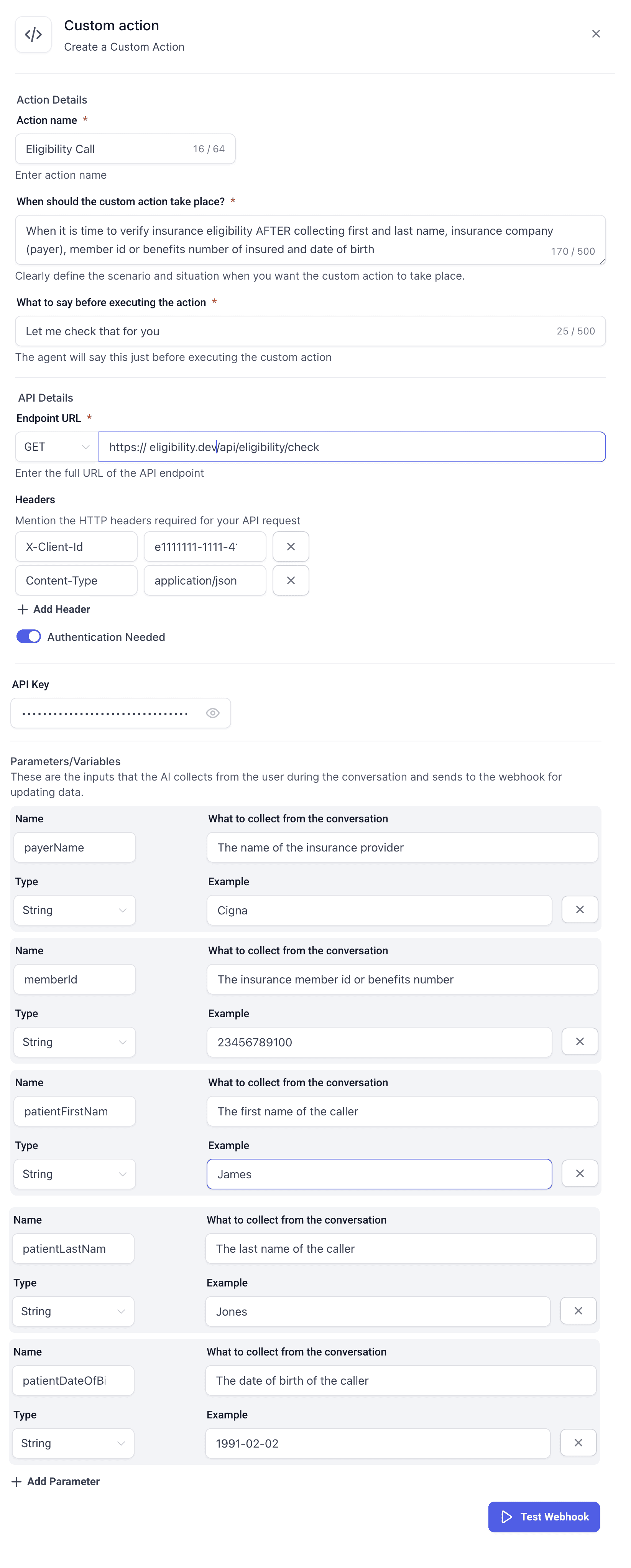
In GHL, eligibility checks are wired up as a Custom Action inside your AI agent configuration. This tells the agent when to call the API, what headers to send, and which conversation variables map to each parameter.
If you are using the hybrid template (standard eligibility + coverage search fallback), you will need two Custom Actions: one named Eligibility Call (GET /api/eligibility/check) and one named Coverage Search (POST /api/eligibility/coverage-search). Set up the standard action first using the steps below, then repeat for the coverage search action with the coverage search parameters.
- 1In your GHL sub-account, open the AI agent and navigate to Custom Actions.
- 2Click Add Action and set the trigger condition to fire after the agent has collected insurance info.
- 3Set the endpoint to
GET https://eligibility.dev/api/eligibility/check. - 4Add headers:
X-Client-Id(your clinic's UUID) andContent-Type: application/json. Enable Authentication and paste your API key. - 5Add the five parameters below, mapping each to the variable the agent collects from the conversation.